WormsPy
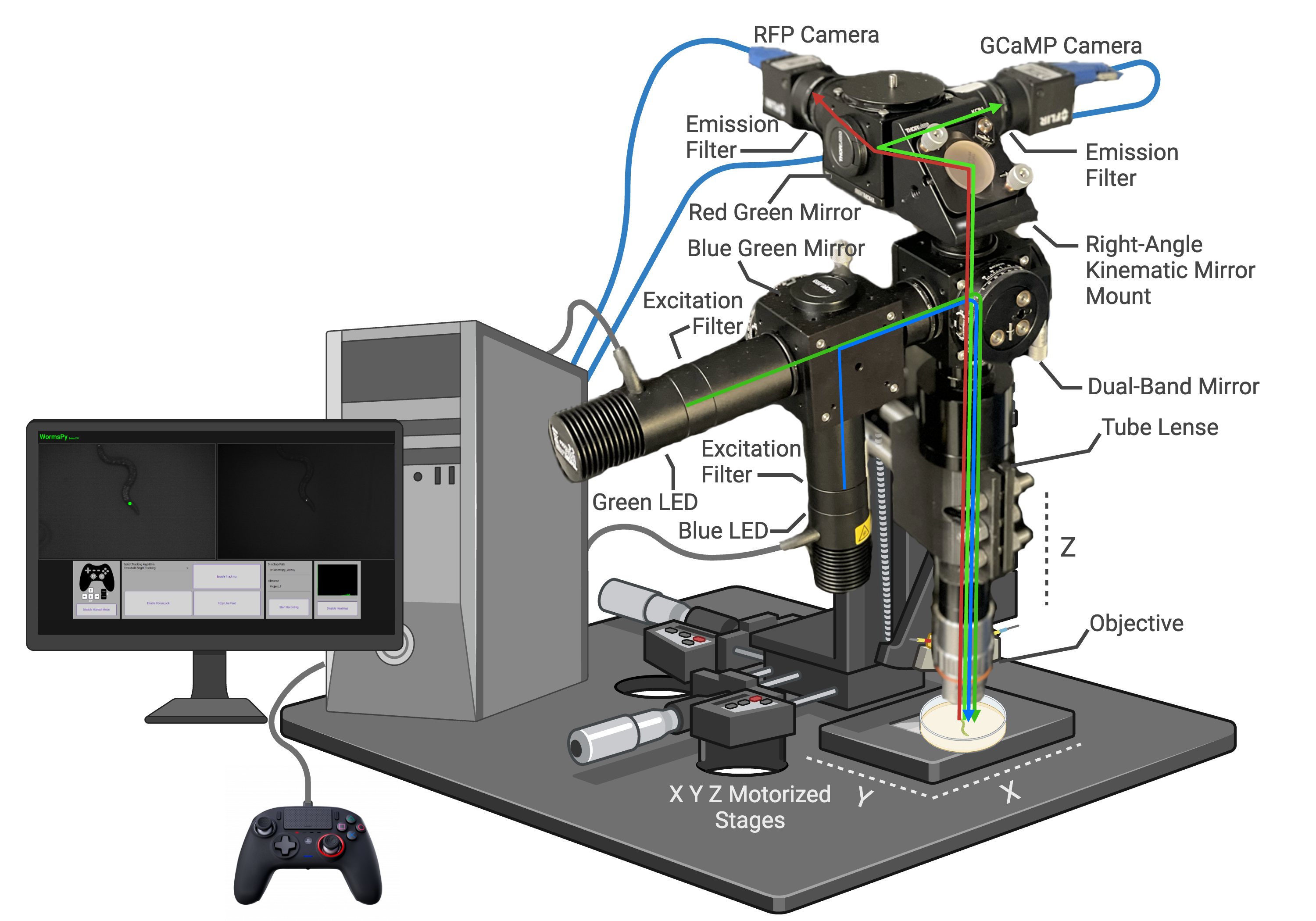 WormsPy is a software for controlling an open source tracking fluorescence microscope. It is designed to utilize two cameras, shifted to different wavelengths to allow simultaneous tracking and behavioural measurements with epifluorescence imaging. The dual recording approach using the same light path allows the user to align the images in post and make inferences about how neural activity affects behaviour and how the animal’s interactions with its environment affect neural activity. While WormsPy was developed for calcium imaging in head sensory and interneurons in C. elegans, its modular design and low cost allows it to be iterated on by other researchers and find applications in new fields.
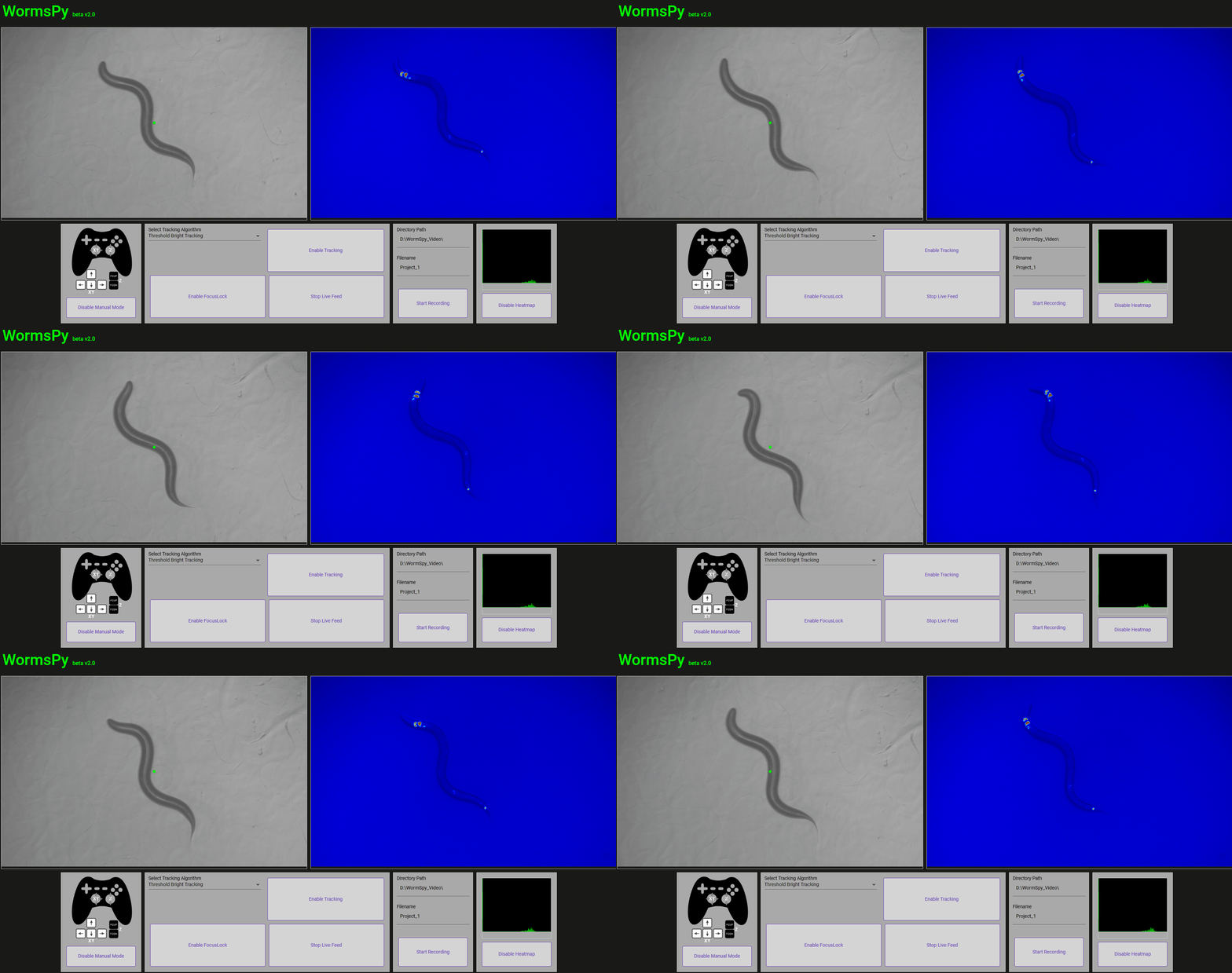
Example of a worm expressing pansensory GCaMP being tracked using WormsPy
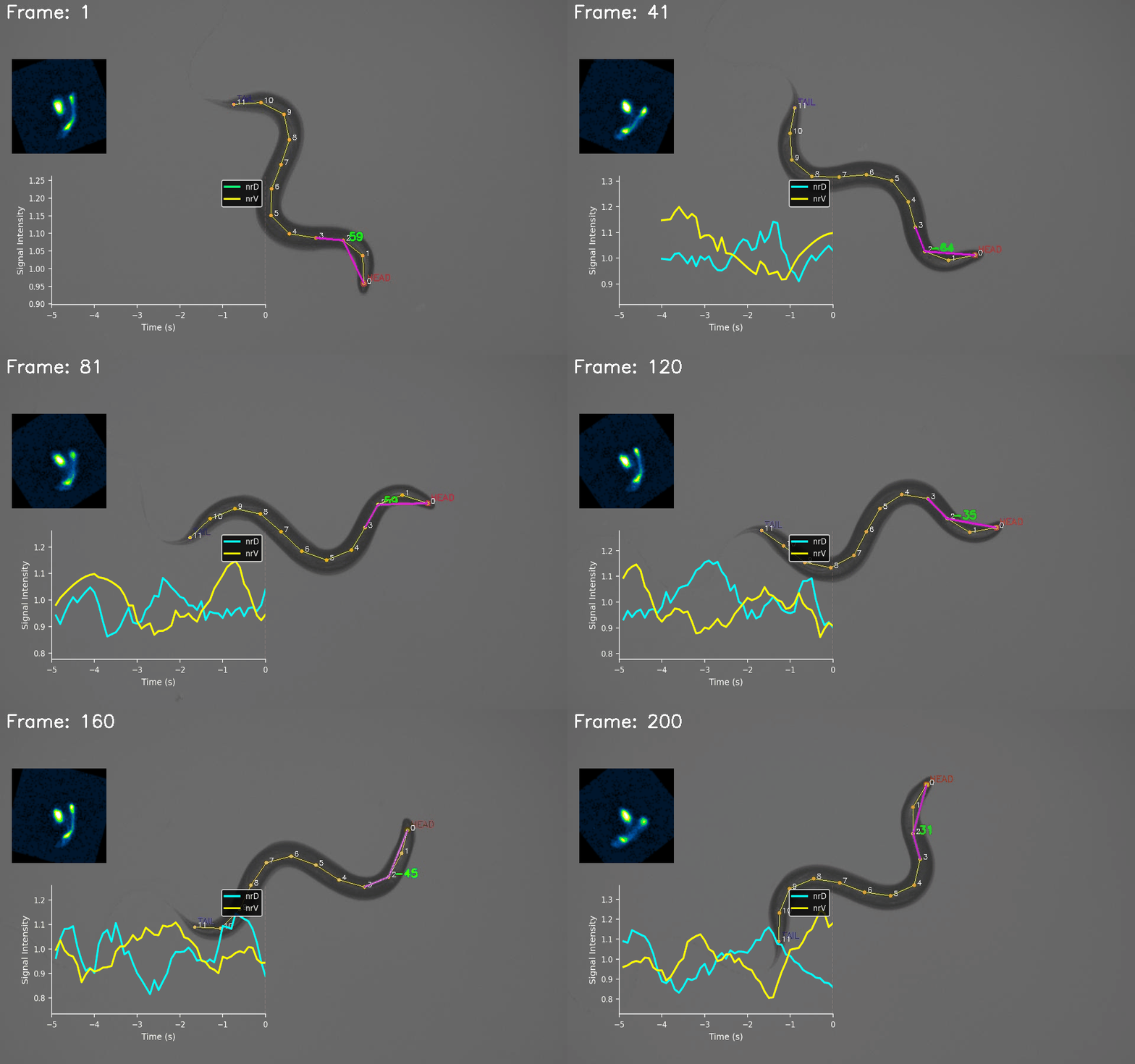
Example behavioural analysis of headbending correlated with compartmentalized calcium activity in nrD and nrV in the RIA interneuron.
Frame-synced recordings and stage position allow for sophisticated offline analysis
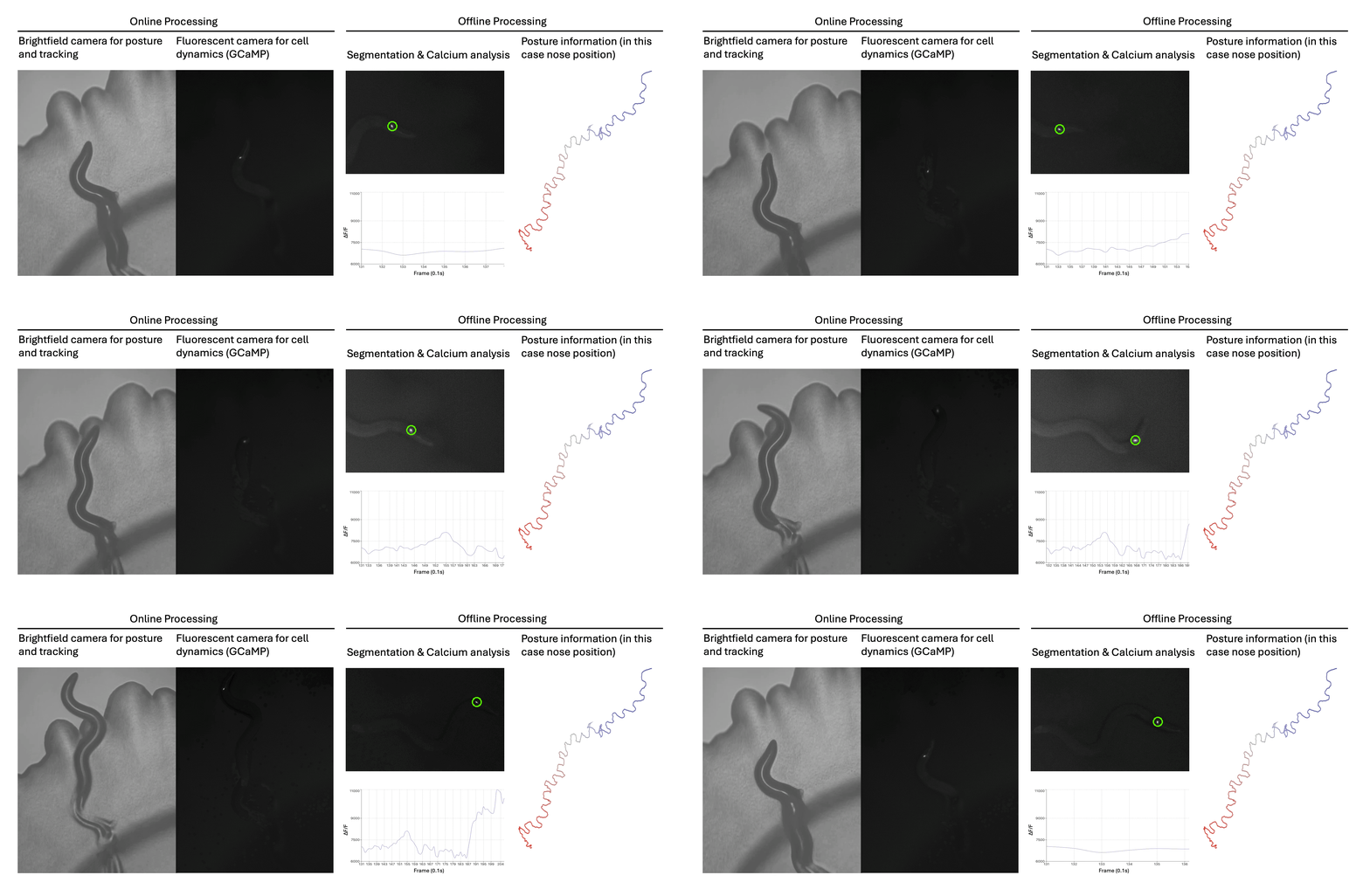
Example with various drosophila larvae expressing jGCaMP8f in muscle tissue courtesy of the Ohyama lab at McGill.
Features:
WormsPy was designed for calcium imaging in head sensory and interneurons in C. elegans. However, many applications are possible by changing the filter sets and objectives and with some slight tweaks to the software. The basic design of WormsPy includes:
- Dual video feeds, brightfield and calcium imaging, but other setups are also possible
- Manual mode: Use a joystick to manually track animals. This is immensly helpful with acquisition to begin tracking and recording and to manually find and maintain the focus.
- Three tracking modes: brightfield thresholding, epifluorescent marker tracking and DeepLabCut markerless pose estimation using a pretrained CNN.
- Frame-synced recording: Set your desired directory and project name. When recording, the software will write the left camera as a compressed .avi file using fourcc ‘MJPG’ and the right camera as an uncompressed 16bit .tif folder to capture the maximum dynamic range of cell activity
- Worm Traces: Recordings also output a timestamped .csv that tracks motor position, allowing the animals path to be traced and compared with the corresponding video frames.
- Closed loop optogenetic stimulation: (forthcoming)
See the demonstration video here: https://youtu.be/mhyYDpziSE8
Building the WormsPy imaging platform:
For a full build guide please see our publication: Nature Communications bioRxiv
Please cite our work if you use this project or any derivative thereof.
@article{Wittekindt2026,
  author    = {Wittekindt, Sebastian N. and Owens, Hannah and Guisnet, Aur{\'e}lie and Wittekindt, Lennard and Hendricks, Michael},
  title     = {An epifluorescence microscope design for naturalistic behavior and cellular activity in freely moving {Caenorhabditis elegans}},
  journal   = {Nature Communications},
  year      = {2026},
  volume    = {17},
  pages     = {4411},
  doi       = {10.1038/s41467-026-72709-w},
  url       = {https://doi.org/10.1038/s41467-026-72709-w},
  publisher = {Springer Nature}
}
Minimum requirements:
Minimum requirements to use WormSpy:
- 2x Spinnaker compatible cameras or any cameras compatible with opencv-python
- XY Zaber motor stage (Controlled with ASCII Commands)
- Z Zaber motor stage (Controlled with ASCII Commands)
- if using DLC, a CUDA capable NVidia GPU (Preferrably with Tensor Cores)
- any modern CPU, though Intel architectures have better performance
- any dual stick controller compatible with PyGame
Getting started with WormsPy:
- Clone the repository, we recommend downloading the zip and extracting to desired location.
- We recommend using MiniConda for environment management: https://docs.anaconda.com/miniconda/miniconda-install/
- Add anaconda to System Path Variables
- Open Anaconda prompt and run
conda init - Open Anaconda prompt, cd to the WormsPy directory
- Run
conda create --name wormspy python=3.8.15 - Run
conda activate wormspy - Run
pip install -r requirements.txt - Install the Zaber Launcher application: https://www.zaber.com/software#pos-download
- Set up your motor connections using ZaberLauncher, note down COM port # for your motors and maximum position index
- Open the file
WormsPy/backend/code/app.pyand adjust COM ports as well as other settings as needed - Adjust your camera settings as desired using the camera’s native software (SpinView for Teledyne cameras)
- Double click StartWormsPy.bat
- In your browser visit
localhost:5000 - Enjoy WormsPy!
Developer’s Notes:
More information for those interested in adapting WormSpy for their use case.
Frontend:
The frontend of WormsPy was developed using Angular (HTML/SCSS/TS). To make adjustments the frontend, the installation of NodeJs is required. Run npm install in the wormspy folder after initially downloading the files. Adjustments to the frontend can be made in the live-feed component found in wormspy/src/app/live-feed.
To continue using flask as a web server and maintain StartWormSpy.bat as an easy launch option, follow these steps:
- Use
ng build --configuration production --deploy-url static/to create new production files in thewormspy/distfolder. - Place the
index.htmlfile into theproduction/templatefolder. - Place all other files found in the dist folder into the
production/staticfolder. Ignore assets unless those have been updated.
Backend:
WormSpy uses a Python Flask web server (app.py) to communicate with the frontend. A combination of the OpenCV and EasyPySpin libraries are used to communicate with the cameras. The Zaber Motion ASCII library is used to control the Zaber motors via the Zaber_messenger_router(), which is why the Zaberlauncher application must be open for WormsPy to work. There is an optional DeepLabCut (DLC) Live tracking option available. To activate, uncomment the code that loads in the pretrained model in lines #87-92.
If you would like to train and use your own DLC model, place your model in the DLC_models folder and replace the skeleton folder in the DLCLive function of the video_feed method.
For more detailed programmatical information about WormSpy, refer to the inline comments found in app.py.
License:
WormSpy was developed by Sebastian Wittekindt and Lennard Wittekindt at McGill University. Funded by the Canadian Institute for Health Research.
Provided as open source software under the MIT license, view the license for details.